Businesses in ChatGPT: what it is, how it works and what it gives your brand
On 10 November 2026 OpenAI announced Businesses in ChatGPT. For the first time a company can claim its profile, update its data and see how ChatGPT presents it. We describe how verification works, what the feature gives you and what it does not yet.
What Businesses in ChatGPT is
According to OpenAI's announcement of 10 November 2026 it is a beta feature meant to help businesses reach the people who use ChatGPT every week (OpenAI cites 1.2 billion). It has three parts:
- a company profile in ChatGPT you claim and, after verification, can update,
- interaction insights, meaning aggregated data on how users reach your business in ChatGPT,
- business agents, a conversation with the company inside ChatGPT that relies on information the company itself provided.
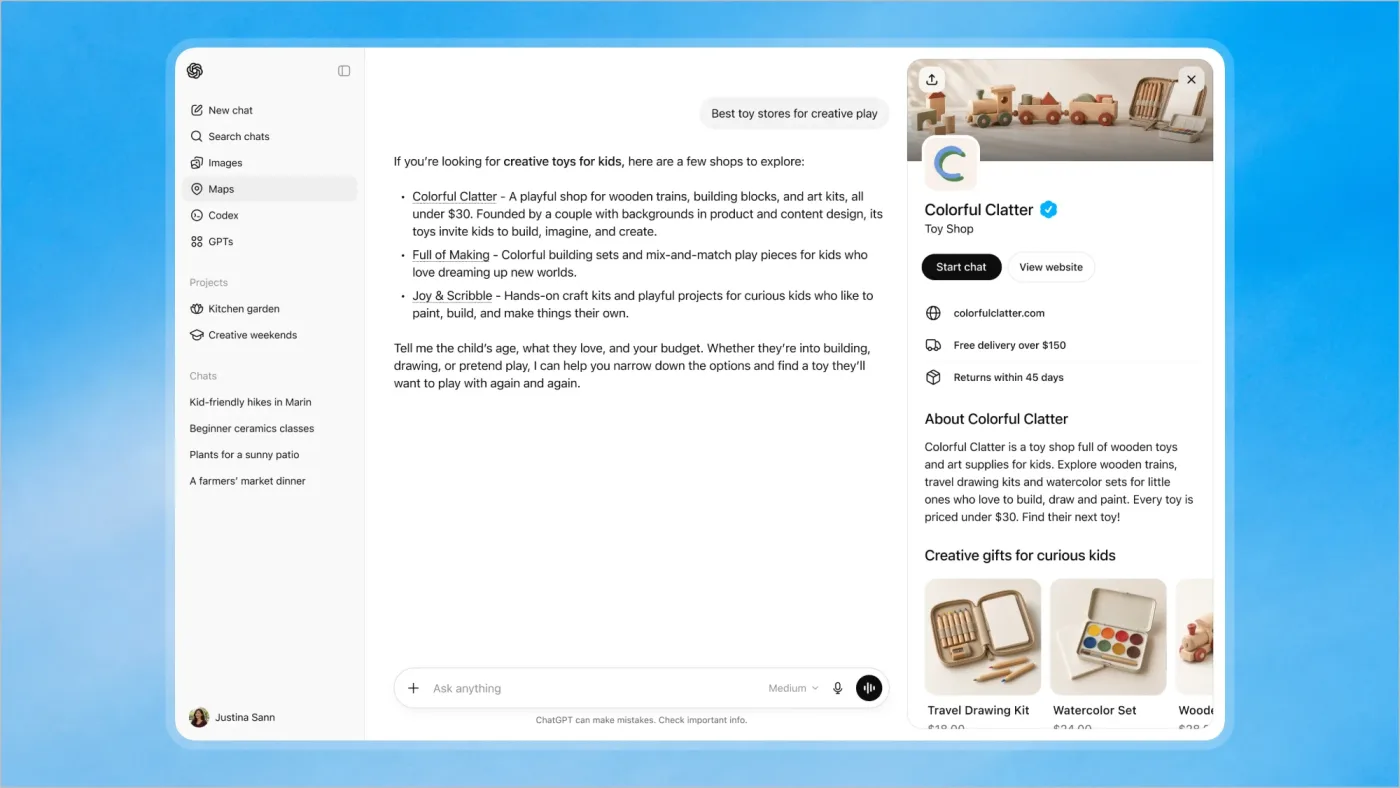
Everything is managed in Business Hub, which you open from the ChatGPT sidebar. That is a real change: until now a company could only hope ChatGPT would read its site and web reviews the right way. Now there is an official channel for passing data at the source. This is what a company profile looks like in a ChatGPT answer (an OpenAI example, a fictional toy shop):
How it works in short
- You claim the profile in Business Hub and confirm your link to the business with one of the methods (phone, email, domain, Shopify).
- OpenAI reviews the claim and replies by email.
- You verify your identity with Persona. Without it you cannot publish changes, connect a product file or see insights.
- You fill in the data: website, description, category, logo, delivery and return policies. If you sell products, you connect a product feed (CSV or a Shopify feed) with prices and availability.
- You view the insights and optionally launch a business agent, if you qualify.
| Element | What it does | Availability according to OpenAI |
|---|---|---|
| Business profile | Current company data, product files with prices and availability | Where ChatGPT is available and verification is supported |
| Insights | Mentions, website clicks, discovery topics over the last 28 days | After identity verification, aggregated, once thresholds are met |
| Business agent | A conversation with the company in ChatGPT about products and policies | E-commerce and online service businesses in the US |
The feature is in beta and the rules may change. We give details according to the OpenAI announcement and the OpenAI Help Center article (checked on 16 November 2026).
Verification step by step: DNS, identity and a company document
A claim does not end with one click. OpenAI first wants confirmation that you are connected to the business, and then identity verification through an external provider (Persona).
Step 1. Confirm your link to the business
In Business Hub you search for the business by name, pick the right listing (or add an online business if it is not listed) and choose one of the methods:
- website domain: you add the TXT record that ChatGPT shows you to your domain's DNS settings. You copy the type, name (host) and value exactly. If someone else manages the domain, ask them to add the record. DNS changes take time, so you come back to ChatGPT afterwards and click “Verify domain”,
- business phone: a code by SMS or an automated call to the number shown in the profile,
- business email: a code sent to the address associated with the business,
- Shopify store: you connect the store and log in to Shopify.
Step 2. Wait for the decision
OpenAI reviews the claim and emails its decision or a request for more information. While it is under review you can cancel the claim.
Step 3. Verify your identity with Persona
After the claim is approved you go through identity verification with Persona. OpenAI says you may need:
- a government-issued ID (for example an ID card or passport),
- business registration information,
- proof that you are authorized to represent the business.
The business name, address and any registration or tax number must match official records. OpenAI does not publish a list of accepted documents, so for a Polish company prepare, for example, a CEIDG or KRS entry, the tax number (NIP) and, if you are not the owner, a power of attorney or another authorizing document. That is our interpretation, not an OpenAI list. The author of one Polish account described taking a photo of their ID and photos of their face from several angles in Persona, and a sole proprietorship claim was approved in under an hour. That is a single case and review times vary.
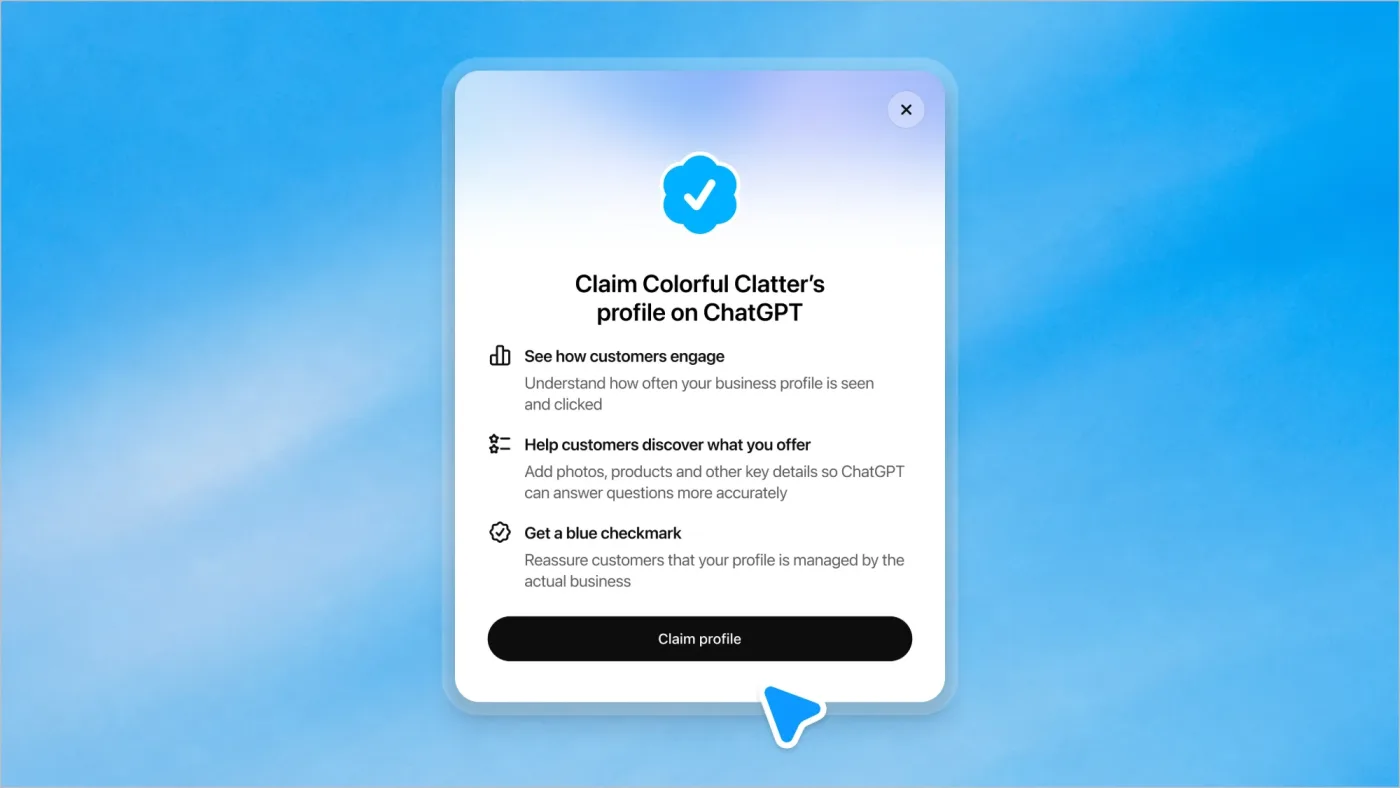
Step 4. The blue check and publishing your data
A claim alone does not give a verified badge. The blue check appears only after Persona verification is approved. After it you can publish changes to your data, connect a product file, view insights and create an agent. OpenAI reviews and publishes changes, so they may appear with a delay, and ChatGPT may also use other sources.
What to prepare before you start
- Access to the domain's DNS, or the person who manages it.
- A business phone and email that appear online as the company's details.
- An ID document of the person making the claim.
- Company registration documents matching the profile data.
- Proof of authorization if an agency or employee is claiming.
Why it can help a business
1. You influence what ChatGPT knows about the company
AI models answer from what they find. When prices, availability or the offer description are outdated or inconsistent, the answer will be imprecise. A profile with data you enter yourself shortens the path from fact to answer. This is exactly what we call the visibility level in AI readiness: AI should know who you are and what you offer.
2. The first official measurement on ChatGPT's side
Until now visibility in ChatGPT was checked by hand, asking questions and recording results (the 15-minute test). Now there is data from OpenAI itself: how many times the company was mentioned, how many times someone clicked through to its site and in which conversation topics it is cited.
3. A conversation with the customer where they decide
When a company appears in a model's answer, the user can click its profile, and if there is a business agent, start a conversation and ask about the differences between options. A conversation with an agent is labelled and separated from the regular ChatGPT answer. The agent answers questions about products and policies and links to your website, because for now it does not complete purchases or bookings.
4. A link to advertising
Businesses can promote their business agent and send users to it from ChatGPT Ads, and sponsored content is clearly labelled. Claiming a profile does not require an ads account. How ads in ChatGPT work is described on our ChatGPT ads page.
Important: OpenAI states plainly that claiming a profile does not guarantee more visibility or control over ChatGPT's independent recommendations. Advertising does not influence independent answers either.
Tracking: what you will see and how to count real traffic
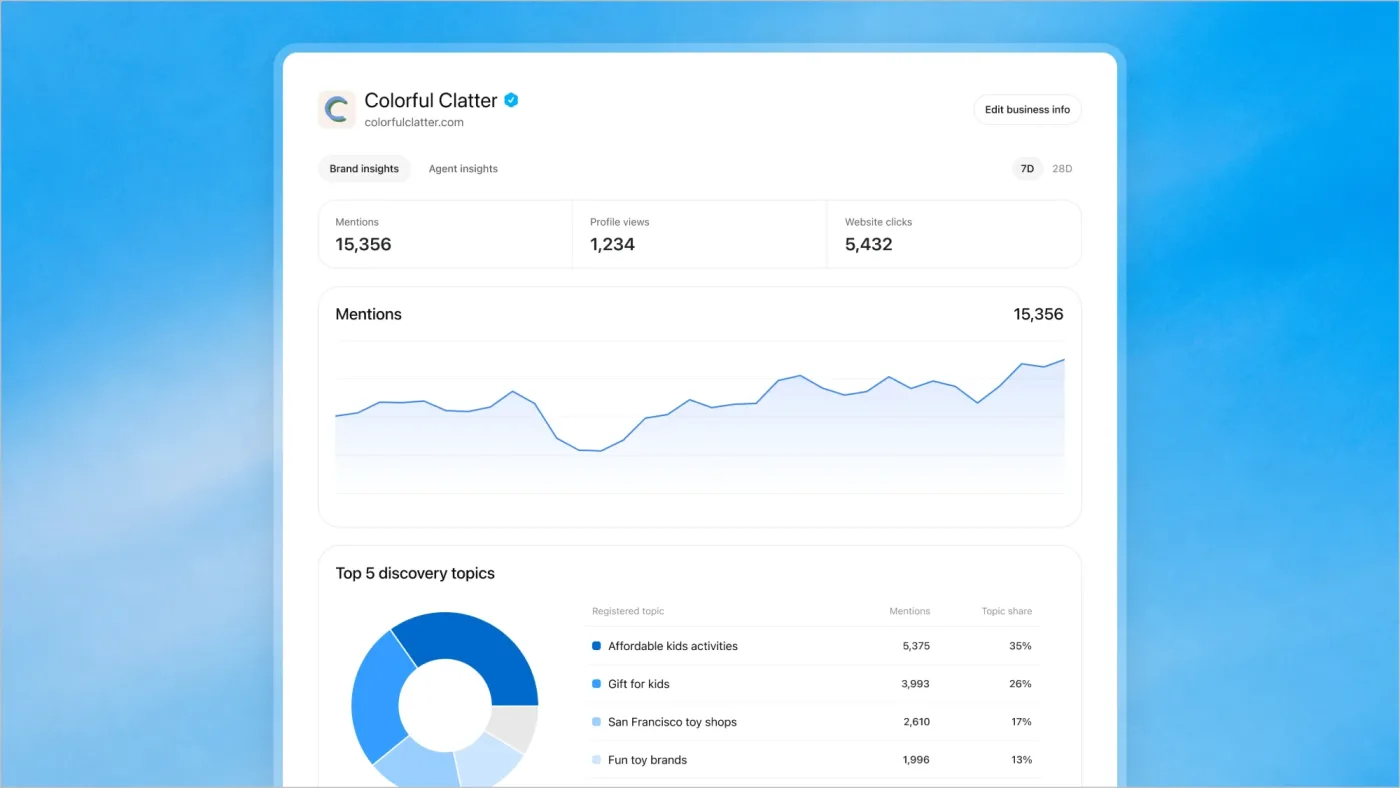
After the claim and identity verification are approved, the Insights tab shows aggregated data for the last 28 days:
- mentions: for an online business a mention counts when ChatGPT references its website, and the brand name alone is not enough,
- website clicks: how many times someone went from ChatGPT to your site,
- discovery topics: common themes in answers that mentioned or cited your business. They do not reveal individual prompts or directly measure customer intent.
OpenAI's sample dashboard also shows profile views and a split between brand and agent insights.
What you will not see
OpenAI does not share the content of user conversations, including chats with business agents. The insights are aggregated and may be incomplete. A blank field means activity did not reach the threshold, data is still being collected or reporting is unavailable. It does not have to mean zero.
A click is not a visit
The click count in Business Hub and the session count in your analytics are two different numbers and there is no reason for them to be equal. Some people close the page before it loads, some do not consent to cookies, and blockers stop the script. That is why you count real traffic yourself:
- In Google Analytics 4 filter traffic by the
chatgpt.comsource. ChatGPT usually adds autm_source=chatgpt.comparameter to links, but check it on your own data. - Build a separate segment or report for that source and watch not only visits but also events that matter to the business: form submission, conversation, purchase.
- Compare trends, not single numbers. If clicks in Business Hub rise while sessions from
chatgpt.comdo not, look for the cause in cookie consent, blockers or site errors. - If you use ChatGPT ads, add separate conversion measurement for the ads (the measurement pixel) to tell paid traffic from organic.
| Question | Where to look |
|---|---|
| Does ChatGPT mention my business and in which topics? | Business Hub (Insights) |
| How many users clicked through to my site? | Business Hub (Insights) |
| How many people actually arrived and what did they do? | Your analytics (GA4, events, conversions) |
| Who is recommended instead of me? | A manual test of questions in ChatGPT and other assistants |
Which countries it works in, including Poland
OpenAI does not publish a separate country list for Business Hub. The condition reads: you can claim an existing business or add one where ChatGPT is available and the required verification is supported, and availability depends on the business's location and type. In detail:
| Element | Scope according to OpenAI |
|---|---|
| Online business profile | Where ChatGPT is available and verification is supported, depending on location and business type |
| Local stores and restaurants | For now only existing listings in the US |
| Business agent | E-commerce and online service businesses in the US that meet the industry rules |
Poland. Poland is on OpenAI's official list of countries supported by ChatGPT (along with, among others, the other EU countries, the United Kingdom, the USA and Canada). That meets the first part of the condition. Whether verification is supported for your business is only visible in Business Hub. A Polish account from 12 November 2026 describes adding and verifying an online business in Poland (a Polish ID, a sole proprietorship). It is one case and not an OpenAI confirmation, so treat it as a hint, not a guarantee. There are no business agents in Poland for now.
What to do now
- Set a baseline. Ask ChatGPT 10 customer questions and record the results so you have something to compare the insights with.
- Check availability in Business Hub (in the ChatGPT sidebar) and claim the profile if you can.
- Prepare documents and DNS access from the list above.
- Tidy the source data: company description, services, prices, availability, return and delivery policies, consistent across the web.
- Connect a product feed if you sell products (CSV or a Shopify feed).
- Set up GA4 measurement for the
chatgpt.comsource and for business events. - After a month compare: mentions and clicks from Business Hub, sessions and conversions from analytics, results of the manual test.
If you want to check whether your business is ready for this channel, start with the AI readiness audit.
The images in this article come from OpenAI's materials and show a fictional business, Colorful Clatter. © OpenAI, all rights reserved. Used to illustrate the feature.
Frequently asked questions
What is Businesses in ChatGPT?
A beta feature announced by OpenAI on 10 November 2026. It lets businesses claim a profile in ChatGPT, update data and product files, view aggregated insights and, in selected cases, launch business agents.
How do I verify a business in ChatGPT?
First you confirm your link to the business with one of the methods: a DNS TXT record on your domain, a code to the business phone, a code to the business email or a Shopify connection. After the claim is approved you go through identity verification with Persona: an ID document, business registration information and proof of authorization. Only then do the blue check and insights appear.
Which documents are needed?
OpenAI lists a government-issued ID, business registration information and proof that you are authorized to represent the business. The name, address and registration or tax number must match official records. OpenAI does not publish a specific list of documents.
Can I see how many people came to me from ChatGPT?
Business Hub shows the number of mentions and clicks to the website plus discovery topics for the last 28 days. You check real visits and conversions in your own analytics, for example by filtering the chatgpt.com source in Google Analytics 4. The two numbers can differ.
Does it work in Poland?
Poland is on the list of countries supported by ChatGPT, and OpenAI lets businesses claim profiles where ChatGPT is available and verification is supported. There is no separate country list for Business Hub, so check availability in the panel. Business agents are for now US only.
Will a ChatGPT profile improve my position in answers?
OpenAI says claiming a profile does not guarantee more visibility or control over ChatGPT's independent recommendations. It gives you a channel for current data and insights.
Can a business agent sell or book?
Not for now. The agent explains products and policies and links to the website, where the customer completes the purchase or booking.